
How to Build Claude Agents with Peec AI MCP

Last updated: 28 May 2026
Short answer: build the Claude agent around Peec AI as the measurement layer, not as a magic content generator. The agent should read visibility, share-of-voice, source, URL, chat, and action data through Peec AI MCP, convert that into an evidence-backed action queue, and require human approval before it changes prompts, tags, tracked brands, or content.
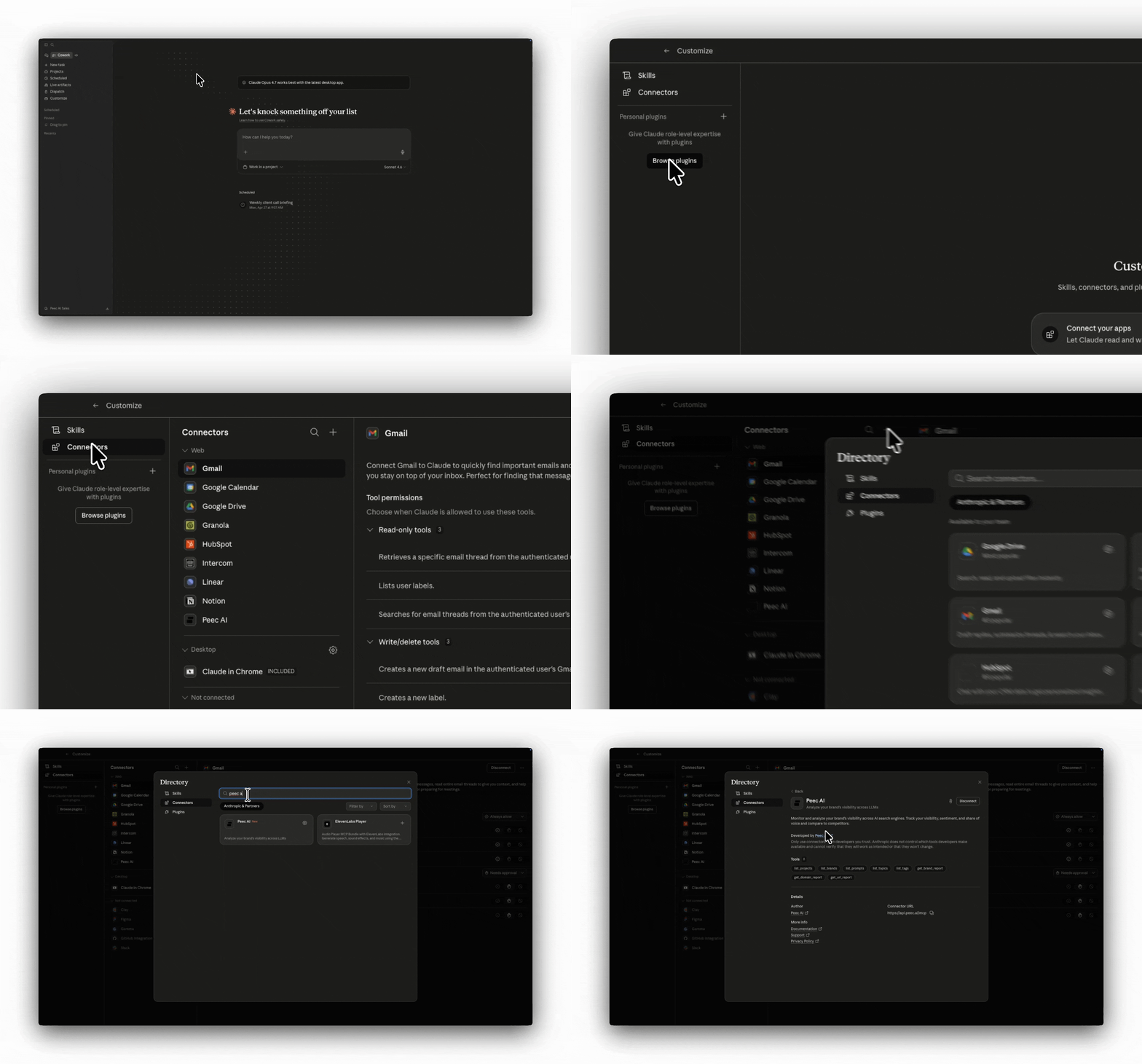
Peec AI's official MCP docs describe a server at https://api.peec.ai/mcp that connects Claude, Cursor, VS Code, Windsurf, and other MCP-compatible tools to the same data visible in the Peec dashboard. The useful agent pattern is simple: Claude reasons, Peec supplies the AI search evidence, and your repo or content system receives only reviewed recommendations.
What should the agent actually do?
A good Claude agent for Peec AI MCP should answer operational questions:
- Which prompts are losing visibility this week?
- Which competitors are being mentioned or cited instead?
- Which domains and URLs are AI engines retrieving?
- Which owned, editorial, reference, and UGC opportunities are worth acting on first?
- Which content pages need new sections, FAQs, schema, internal links, or source coverage?
It should not blindly publish, rewrite, or mutate tracking setup. Peec's MCP docs separate read tools from write tools, and write/delete actions require confirmation. Keep that boundary in the agent brief.
Reference architecture
| Layer | Responsibility | Failure mode to prevent |
|---|---|---|
| Claude agent | Plans the workflow, asks Peec for data, writes the report | Hallucinating metrics or inventing source gaps |
| Peec AI MCP | Supplies projects, brands, prompts, chats, reports, sources, and actions | Treating raw IDs as user-facing conclusions |
| Content repo | Stores accepted changes to pages, articles, schema, and tests | Shipping unreviewed recommendations |
| Harness | Tests SEO/GEO metadata, images, schema, links, and mobile rendering | Green tests that miss AI-search requirements |
Step-by-step build
- Add the Peec AI MCP server to the Claude surface you use.
- Verify the connection by listing Peec projects, then select the correct project by name.
- Resolve brands, topics, tags, and model channels before reporting. Do not show raw IDs to stakeholders.
- Pull a default 30-day window for strategic analysis and a 7-day window for weekly movement.
- Break visibility and share-of-voice down by engine, topic, and date where possible.
- Inspect source domains and URLs, especially gaps where competitors are cited but your domain is not.
- Convert the evidence into a ranked action queue: owned pages, editorial coverage, reference sites, and UGC/community work.
- Push only reviewed content recommendations into Claude Code, your CMS, or a Jira/Linear board.
Agent prompt skeleton
You are an AI search growth agent for <brand>.
Use Peec AI MCP as the source of truth for visibility, sentiment, share of voice,
position, sources, citations, prompts, chats, and Peec Actions.
Resolve project, brand, topic, tag, and model names before presenting results.
Default to 30 days unless the user asks for a weekly pulse, then use 7 days.
Show percentages only for percentage metrics. Do not convert retrieval_rate or
citation_rate into percentages. Confirm before any write or delete action.
Return: executive summary, engine breakdown, source gaps, recommended content
changes, owner, risk, and evidence links.
Where this fits in a Schmitdy workflow
Schmitdy would use this pattern after a free AI Search audit. The audit finds the prompt and source gaps. The Claude agent keeps the weekly loop alive. Claude reads Peec, drafts the evidence summary, proposes content or outreach moves, and hands the implementation to Claude Code or a human editor.
For deeper context, compare this with our AI search agency selection guide, OpenClaw vs Claude Code, and pricing.
Source and fact ledger
- Peec AI MCP introduction:
https://docs.peec.ai/mcp/introduction - Peec AI MCP setup guide:
https://docs.peec.ai/mcp/setup - Peec AI MCP tools reference:
https://docs.peec.ai/mcp/tools - Peec AI MCP prompts reference:
https://docs.peec.ai/mcp/prompts - Peec AI MCP launch article:
https://peec.ai/blog/peec-ai-mcp
Frequently Asked Questions

Founder, Schmitdy
Marco builds AI search growth systems that turn prompts, sources, content, and agents into pipeline for B2B teams.
Related Articles

Peec AI MCP Deep Dive: How AI Search Data Becomes Agentic GEO Execution
Peec AI MCP turns AI visibility data into an agent-readable data layer. The winning workflow is not dashboard replacement; it is measured, source-led execution.

How to Build a Claude Plugin with Peec AI MCP
A plugin gives Claude repeatable instructions. Peec AI MCP gives it live AI-search data. The boundary between them is what makes the system safe.
How to Use Peec AI MCP with Claude Code
A practical Claude Code workflow for connecting Peec AI MCP, reading source gaps, and shipping reviewed blog and GEO improvements.
See where AI search is already choosing your competitors
Request the free AI Search audit and get the prompts, source gaps, and next actions that matter for pipeline.
