



TL;DR
GA4 now classifies recognized assistant referrals in its default AI Assistant channel, using the medium ai-assistant. Start in Traffic acquisition with Session default channel group, then verify Session source / medium and the landing page. Google AI Overviews and AI Mode remain in Organic Search, not AI Assistant. GA4 reports measured sessions that resulted from identifiable referrals, not every AI-influenced visit, the private prompt, or revenue caused by an answer.
You open GA4 after publishing a run of useful pages. ChatGPT appears in one report, Google appears in another, and direct traffic has moved too. The temptation is to force every suspicious session into one neat AI total.
Do not. A useful report starts with what the browser and analytics implementation actually recorded. It then connects those sessions to landing pages, meaningful actions and separately verified commercial outcomes. Anything the available evidence cannot identify stays unknown.
What changed in GA4 in May 2026?
On May 13, 2026, Google added default measurement for traffic from recognized AI assistants. When GA4 recognises one of those referrers, it sets the medium to ai-assistant, the campaign to (ai-assistant) and the default channel to AI Assistant.
That makes the default channel the right starting point for a current property. Many older guides tell you to build a regex-based custom channel before you can see AI referrals. That was a sensible workaround before the default existed. It is no longer the first setup step for recognized sources.
| Question | Current method | Method to treat with care |
|---|---|---|
| Where do recognized assistant referrals appear? | Default channel group: AI Assistant | A hand-maintained regex as the only source of truth |
| Where do Google AI Overview and AI Mode clicks appear? | Organic Search | AI Assistant |
| How do you verify the classification? | Session source / medium plus landing page | Channel total without source-level inspection |
| When is a custom group useful? | Gaps, continuity and property-specific definitions | Blindly copying an old source list |
Method note, checked September 14, 2026: this guide uses Google's default AI Assistant definition as the baseline. Source recognition can change. Recheck Google's channel documentation before changing a production reporting definition.
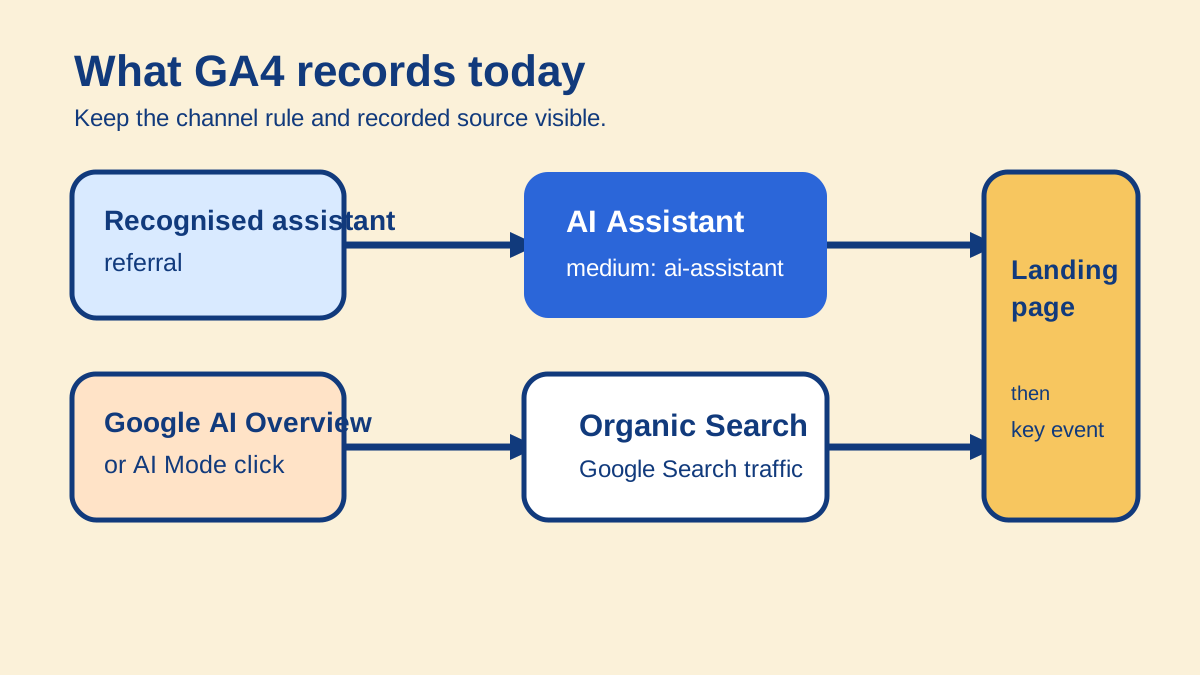
The two channels answer different questions. Combining them may be useful for analysis, but it should never erase the underlying classification.
Where should you look for AI referral traffic in GA4?
Open Reports, then Acquisition, then Traffic acquisition. Use Session default channel group as the primary dimension and filter for AI Assistant. This is a session-level view of how visits began, which is what you need when the question is how a visitor arrived.
Next, add Session source / medium as a secondary dimension. The channel tells you which rule matched. The source and medium let you inspect the recorded origin rather than trusting an unexplained total. For a recognized assistant referral, expect the medium ai-assistant.
Then add Landing page + query string, or open the Landing page report and add Session source / medium there. Google's landing-page dimension is the page path and query string associated with the first page view in a session. That gives you the page that received the arrival, not merely a site-wide channel count.
Use a date range that begins after the default launched when you are evaluating the new classification. If you compare it with earlier periods, label the measurement break. Historical patterns made with a custom definition and new default-channel patterns are not automatically equivalent.
Your working table should retain at least:
| Field | Why keep it |
|---|---|
| Date range | Makes the classification and campaign context checkable |
| Session default channel group | Shows the GA4 rule that matched |
| Session source / medium | Shows the recorded source and classification detail |
| Landing page + query string | Shows where the session began |
| Sessions and engaged sessions | Separates arrivals from visits with meaningful engagement |
| Key events | Shows defined on-site actions, not sales qualification |
Do not use First user default channel group for this job unless you specifically want the channel that first acquired the user. Do not use an event-scoped channel dimension and describe it as the session's origin. Scope changes the question.
Why are Google AI Overviews and AI Mode not in AI Assistant?
Google classifies clicks from AI Overviews and AI Mode as Organic Search. Its Search Central documentation also says appearances and clicks from these AI features are included in Search Console's Web performance reporting.
This means an AI-influenced Google click can be present without appearing in GA4's AI Assistant row. That is expected behavior, not necessarily a tracking failure.
Use Search Console and GA4 together. Search Console records the Google Search performance surface. GA4 records the subsequent site session and actions when measurement is available. Neither gives you a clean report containing every AI Overview or AI Mode prompt that led to a visit.
Avoid creating a custom rule that simply sweeps all Google organic traffic into an AI bucket. It would make the number larger while making it less truthful. If you run a separate analysis of Google AI visibility, keep its definition, source and limitations beside the chart.
Do you still need a custom AI channel group?
Sometimes. A custom channel group can still be useful when you need to include a source GA4 does not yet recognise, preserve a clearly defined legacy comparison, or create a property-owned analytical view that combines several channels for one business question.
First inspect the default AI Assistant row and its Session source / medium values. Then list the genuine omissions you can demonstrate. Build a custom definition only for that stated purpose.
Order matters because GA4 assigns traffic to the first matching channel. Put a specific AI-assistant rule above broader Referral or Organic Search rules. Check the result at source and medium level after saving it. A broad regex copied from an old article may catch unrelated referrers, miss new assistants, or override traffic you wanted to retain elsewhere.
Google says custom channel groups can be applied retroactively in supported reports. If you make a custom group the property's primary channel group, the primary-group change affects reporting from that point forward. Custom channel groups also have feature and quantity limits, so they are not a free replacement for a documented measurement model.
A maintainable custom definition has four things written beside it:
- The reporting question it exists to answer.
- The exact source and medium conditions, with the date checked.
- Its position above broader rules.
- A recurring source-level review for false positives and missing referrers.
That note matters more than a clever regular expression. Assistant domains, redirect behavior and analytics products change.
What does an AI referral session actually prove?
A recorded AI Assistant session supports a narrow statement: GA4 classified the session under its current rules using the traffic data it received. The landing-page report can then show where that measured session began.
It does not reveal the visitor's private prompt. It does not prove which sentence in an answer influenced the click. It does not prove the assistant caused an inquiry or that the inquiry was commercially suitable.
OpenAI says links from ChatGPT search include utm_source=chatgpt.com. That is useful attribution evidence when the parameter survives the journey and your analytics setup records it. It still describes a measured referral visit, not a complete platform-side click count. A copied link, a follow-up branded search, a bookmark or a visit after reading an answer on another device may arrive without that evidence.
Use an evidence ladder instead of a single conversion claim:
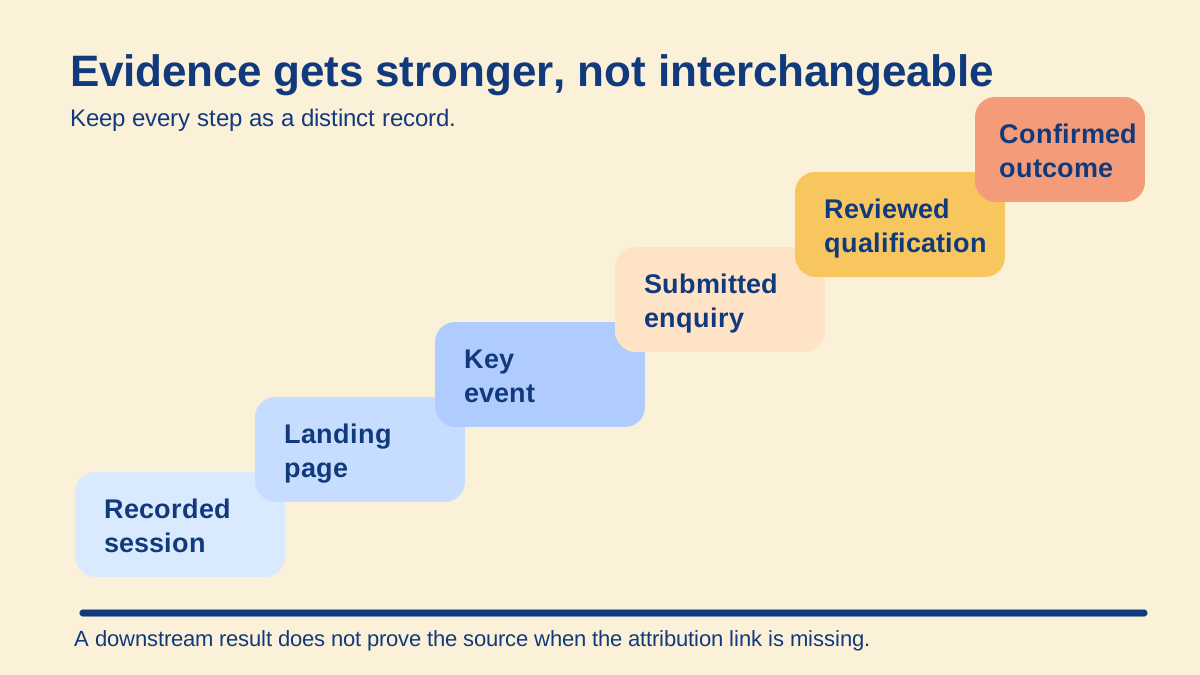
Each step needs its own record. A later outcome does not repair a missing attribution link earlier in the journey.
| Evidence step | What you can say | What remains unproved |
|---|---|---|
| AI Assistant session | GA4 classified a recorded visit under that channel | The originating prompt and every influence |
| Landing page | This was the first recorded page in the session | That the page caused the next action |
| Key event | A defined on-site event fired | Lead quality or revenue |
| Submitted inquiry | A valid request reached your system | Commercial fit |
| Qualification | The inquiry met a recorded business rule | That the assistant caused the outcome |
| Confirmed booking or sale | The downstream outcome was verified | Incremental impact without a comparison design |
How do you connect AI sessions to useful outcomes?
Start with a small number of key events that represent real progress. A submitted form, completed assessment or confirmed booking is more useful than counting every button click as success. Test each event in the site and GA4 before using it in a report.
Keep the acquisition record joined to the landing page and session where your implementation permits it. Preserve the original source fields through internal navigation and redirects. If the user submits an inquiry, store a privacy-safe attribution reference in your own system so an authorized team can later relate the request to its acquisition context.
Assess qualification outside GA4 using explicit business criteria. For example: a genuine organization, an in-scope need and a reachable contact can be reviewed as separate facts. An unreviewed submission remains unreviewed. A booked call should require a booking-system confirmation, not just a click on the calendar button.
Do not send names, email addresses, phone numbers or other personally identifiable information to Google Analytics. Google also warns against putting such data in URLs, custom dimensions or campaign parameters. Keep sensitive sales details in the appropriate secured system and connect only the minimum privacy-safe reference needed for analysis. Apply the consent and retention rules relevant to your organization and market.
For a wider model that joins AI visibility, citation evidence and commercial outcomes without pretending they are one funnel, use our AI-search measurement methodology.
What remains dark or zero-click?
Some AI influence will never appear as an identifiable referral session. That is a property of the journey, not something a more aggressive regex can solve.
Dark traffic can include copied links with stripped parameters, visits through apps that suppress referrers, cross-device journeys, bookmarks and later direct visits. Some of it may appear as Direct. Direct is not a synonym for AI.
Search-assisted traffic can include someone reading an assistant answer and then searching for the brand. GA4 may correctly classify the visit as Organic Search because that is the recorded arrival. The earlier influence is unknown unless the visitor declares it or another consented research method connects the journey.
Zero-click exposure happens when the answer satisfies the person without a site visit. GA4 records website sessions in its session-scoped Traffic acquisition reporting; a journey without a site visit leaves that session metric unavailable. Visibility monitoring or saved answer samples can measure a separate question, such as whether the brand appeared in a defined set of answers, but they cannot be added to sessions as though the units were interchangeable.
Consent choices, blocked scripts and implementation failures also create gaps. Record missing data as unavailable when you cannot distinguish those causes. Never turn unavailable into zero.
A practical GA4 AI referral checklist
- Confirm your GA4 property is receiving current website data.
- Open Traffic acquisition and select Session default channel group.
- Filter for AI Assistant and note the date range.
- Add Session source / medium and inspect every material source.
- Add Landing page + query string to identify entry pages.
- Keep Google AI Overview and AI Mode clicks in Organic Search.
- Create a custom group only for a documented gap or analytical need.
- Put specific custom rules above broader Referral and Organic Search rules.
- Test key events and exclude internal tests from business reporting.
- Verify inquiries, qualification and bookings as separate records.
- Keep personal data out of GA4 and campaign parameters.
- Label dark, direct and zero-click influence as unknown unless separate evidence supports it.
- Recheck Google's channel definition and your source list on a fixed schedule.
This produces a smaller number than an all-purpose AI estimate. It is also a number another person can inspect, reproduce and use to decide what to improve.
If you want to connect AI visibility, content changes and qualified outcomes into one defensible operating model, request a free AI Search audit. The audit is a measured starting point, not a promise that every influenced visit can be identified.
Sources
- Google Analytics: What's new, May 13, 2026.
- Google Analytics: Default channel group.
- Google Analytics: Custom channel groups.
- Google Analytics: Traffic acquisition report.
- Google Analytics: Landing page report.
- Google Analytics: Best practices to avoid sending PII.
- Google Search Central: AI features and your website.
- OpenAI: Publishers and Developers FAQ.


 Squarespace
 Webflow
 Sanity
 Shopify
 HubSpot