



TL;DR
Keep Google Business Profile, your location pages and the places that list your business accurate and consistent. Google recommends current profile information for its AI-search features, but completion does not guarantee a recommendation. Start with seven checks covering identity, hours, pages, menus, reviews, listings and verification.
A customer asks for somewhere to eat after 9pm. Your restaurant stays open until 11pm, but the kitchen closes at 8:30pm. A perfectly completed profile can still leave that customer with the wrong answer if the distinction is missing from the information they find.
That's the useful starting point for local AI visibility: make the facts needed for a decision easy to find, then check whether the answer preserves them. In this guide, we separate Google's published guidance from the maintenance routine we recommend for a business with one location or several.
What does Google Business Profile control in AI search in 2026?
Google Business Profile lets a business manage information that appears in Google Search and Maps. It sits within a wider information system: Google says its place profiles combine public web content, licensed data, user contributions and its own interactions with places.
For local ranking, Google's published factors are relevance, distance and prominence; its current summary also calls prominence popularity. Relevance concerns fit with the search, distance concerns the searcher's location, and prominence concerns how well known a business is. These are statements about Google's local results.
Google's separate guidance for AI Overviews and AI Mode recommends current Business Profile information. It also says supporting website links must be indexed and eligible for a search snippet, with no special AI markup required. Neither document establishes a universal Business Profile ranking formula for other assistants.
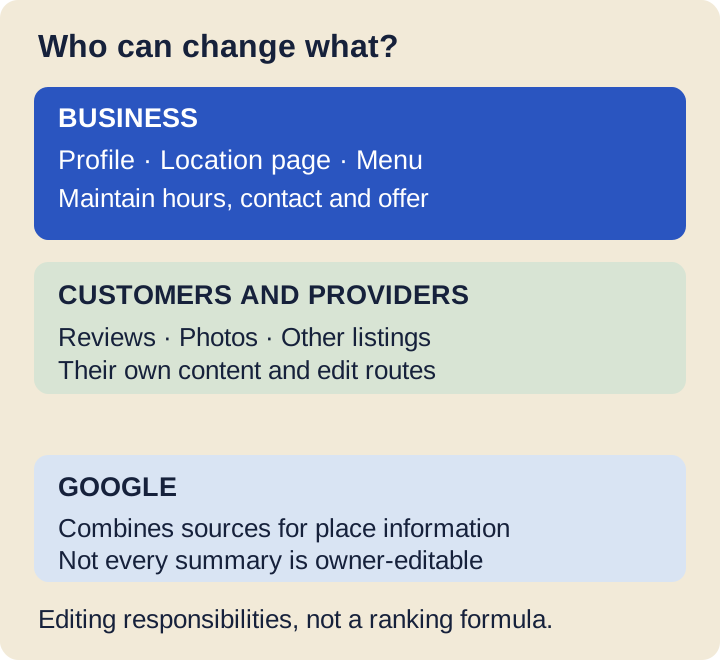
Use this as a map of editing responsibility. It is not a diagram of every AI engine's retrieval system.
1. Is the profile describing the right business?
Start with the real-world business identity, then choose the category that describes its main activity. Google's representation guidelines require accurate names and locations; adding service keywords to a trading name is not a substitute for filling in the relevant fields.
Check the map pin, address and phone against what a visitor would actually use. For a group, confirm that the profile's website destination identifies the branch, rather than making the visitor guess which location they found. Don't create additional profiles simply to cover more services or search phrases.
Google's category guidance says to choose a specific primary category and use additional categories for other genuine activities. A restaurant with a bar should describe what it really operates; it shouldn't collect loosely related categories to chase a longer list of queries.
Keep an internal record of who can edit each profile. If an agency manages it, the business should still know who owns the account and where change requests go. Fields stay accurate longer when someone owns them.
2. Do the hours answer the customer's actual question?
Separate normal opening hours, date-specific exceptions and service hours. A customer deciding whether to visit needs to know which activity is available, not just whether someone is still in the building.
Use special hours for particular dates, including relevant holiday changes. Where the profile supports additional service hours, keep them consistent with the operation. Explain distinctions such as kitchen closing time on the location page too.
For the late-dining example, write a clear statement such as “Kitchen closes at 8:30pm; bar open until 11pm” only after the venue manager confirms it. Don't describe the restaurant as serving food until 11pm because the bar stays open. That correction helps the visitor even before any search result changes.
We recommend checking the next holiday when reviewing regular hours, rather than waiting for the day itself. After an edit, open the public listing and the location page. A saved change and a visible change are different checkpoints.
3. Does each location have a page worth linking to?
A useful location page answers the branch-specific questions that a group homepage cannot. Put the location name, address, phone, opening hours and relevant services in readable page text, with direct routes to its menu and booking destination.
Add distinctions that change the decision. Step-free entry, a private room or outdoor seating belongs on the page when the business can verify it. Keep conditions attached: a room with a minimum booking size is a different offer from a table available to everyone.
Make the page reachable from your location finder and normal navigation. Check it on a phone, including any consent banner or booking widget. If the essential details disappear behind an account requirement or a broken component, the page is a poor customer destination regardless of how its metadata reads.
For Google AI-search supporting links, the usual crawl, index and snippet conditions still apply. Our practical recommendation is to keep the key facts in visible text and use clear internal links. There is no need to build a separate page written only for bots.
4. Do the menu and booking links reach the right offer?
Treat menus and booking links as separate items to test. The website button, menu button and reservation button can lead to different destinations, and a correct homepage does not prove the other two work.
Google's menu editor documentation covers item descriptions, prices, menu URLs and preferred menu sources. It also describes transcription from a business website and experimental AI-assisted conversion of uploaded menus. Review any generated version before using it, especially the relationship between a dish, its price and the correct section.
Open the public menu as a visitor. Does it belong to this location, and is an expired seasonal offer clearly retired?
Keep a readable web menu alongside any downloadable version. Our guide to building a restaurant menu page covers the implementation work.
Check reservation and ordering destinations under Google's local business links guidance. Record third-party links you don't control and use the appropriate provider or removal process. Don't stop at checking that a URL returns a page: check that it offers the intended action at the intended branch.
If you're unsure which local questions and pages to prioritise, request an AI-search audit. Start with the answers customers need before they visit.
5. Are reviews authentic, and which summary can you edit?
Reviews are customer accounts of an experience. Ask for an honest review without a reward, a rating condition or suggested keywords. Google's Maps content policy prohibits incentives, selective solicitation of positive reviews and requests for specific review content.
That rules out a script asking guests to mention “best private dining near me”. A review request should leave the customer's judgement and wording with the customer. Don't turn review collection into a manufactured set of search phrases.
Also identify the type of text you're trying to correct. Google's business-summary guidance distinguishes owner-editable descriptions, editorial summaries and snippets derived from reviews. Owners cannot directly edit an editorial summary in the way they edit their business description.
Respond to genuine service feedback and use Google's reporting route for content that meets its criteria. A negative opinion is not automatically a factual error. If your own page promises a facility the location no longer has, correct that page rather than expecting a review reply to repair the offer.
6. Do listings and structured data agree with the visible page?
Check the listings customers actually encounter, then correct the important discrepancies. Start with the directories, reservation partners and local publications visible in searches for your business. A large distribution count is less useful than knowing where a wrong address remains public.
Keep other map listings in scope too. Apple Business lets owners manage location details and hours shown on place cards. Check those public details separately rather than assuming a Google edit has updated every map service.
Google can update profile information using other sources. That is a reason to review updates and check likely sources of a recurring error. It does not mean every directory entry carries the same weight, or that a particular number of citations guarantees visibility.
On the website, use an appropriate LocalBusiness subtype, such as Restaurant, to describe the location. Relevant properties include address, telephone, opening hours, URL and, for a restaurant, the menu URL. Give each branch its own accurate values.
The Restaurant vocabulary defines the type and its properties, while Google's documentation describes its search-feature requirements. Keep those two questions separate: a vocabulary property can exist without creating a dedicated Google result.
Google's structured-data policies require markup to represent the visible page. Test it, but remember that a validation pass does not verify that the venue actually opens at the stated time. Don't add invented ratings or expect markup to overwrite a conflicting profile field.
7. How do you check the result without inventing an AI score?
Keep three records: facts corrected, answers observed and customer actions. Each answers a different question. A cleaner set of facts shows maintenance progress; an observed recommendation shows what one engine returned under recorded conditions; a booking shows a customer outcome.
Google's Business Profile performance report includes interactions such as website clicks and call-button clicks, and can include activity from Ads. A call-button click is not proof of a completed call. Profile activity alone does not establish which customers came from an AI answer.
For answer checks, record the engine, date, question, requested location and relevant session conditions. Save the answer and its displayed sources. Repeat the same question set over time and record absences as well as mentions; don't turn a single favourable response into a trend.
ChatGPT search can use location information and search partners. That makes the stated place and search conditions important when comparing answers. Check the links the answer actually provides instead of assuming that a familiar Maps result supplied every fact.
Keep website enquiries and completed bookings alongside these observations where measurement and consent allow. Compare equivalent periods and note promotions, closures or menu changes.
Report what the evidence supports, including unknown attribution. A busy week after an edit does not isolate the edit's effect.
What would a three-location check look like?
Here is an illustrative maintenance audit, not a study or a visibility benchmark. Imagine three locations and six facts per location: address, normal hours, next holiday hours, menu or service URL, booking URL and phone. Compare each public fact with the manager-confirmed record.
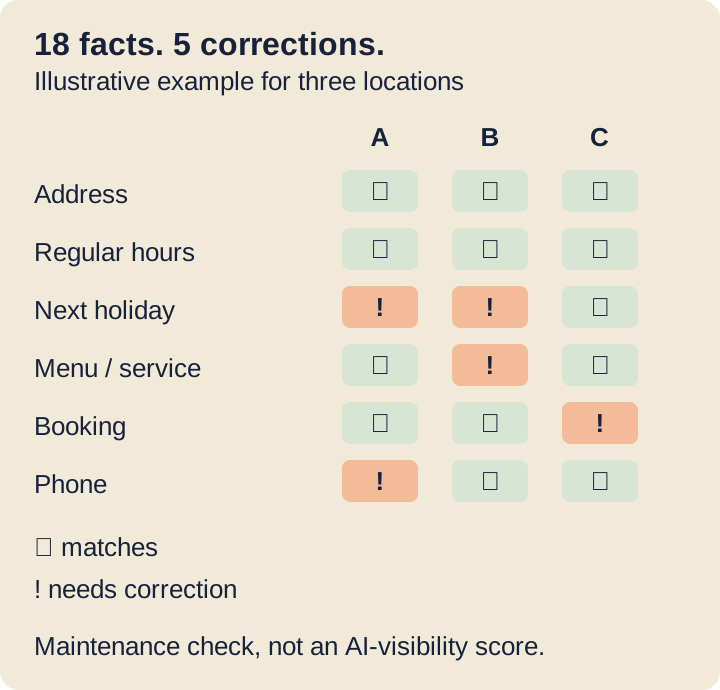
Example only: the five marked cells become a correction queue. They do not predict how often a business will appear in an AI answer.
The five flagged cells in this example could become the following work list. Each row names the location as well as the field, so two holiday errors remain two separate jobs.
| Example correction | Start here | Then verify |
|---|---|---|
| A: next holiday hours are wrong | Profile hours and location page | A's public hours for that date |
| B: next holiday hours are missing | Profile hours and location page | B's public hours for that date |
| B: menu opens another branch | Menu destination and provider settings | B's name, items and prices |
| C: booking link reaches another branch | Booking provider and profile link | Availability for C, not another branch |
| A: phone number is outdated | Profile contact details and location page | A's current customer contact number |
Assign an owner and a due date to each of the five corrections. Mark it complete after reading the public result, and retain unresolved provider requests separately. If all 18 facts eventually agree, you've cleared this maintenance check; you still need separate evidence about recommendations and bookings.
Start with the discrepancy most likely to spoil a visit. The next useful job is usually a precise correction to an important fact, followed by a public check.


 Squarespace
 Webflow
 Sanity
 Shopify
 HubSpot